Key takeaways
- Power BI Desktop and Power BI Service are not competitors: Desktop is where reports are built, and Service is where they are shared, refreshed and viewed.
- Power BI Desktop is a free Windows application for connecting data, transforming it with Power Query, building models with DAX measures and designing reports, but it cannot share reports.
- Power BI Service, at app.powerbi.com, adds scheduled refresh, row-level security, dashboards and workspace collaboration, and lets colleagues view reports in any browser or the mobile app.
- The standard workflow is to build in Desktop, publish the .pbix file to a Service workspace, configure scheduled refresh, and republish from Desktop whenever changes are needed.
Learn the usage of each version
When businesses first start with Power BI, one question comes up almost immediately: what exactly is the difference between Power BI Desktop and Power BI Service? Moreover, which one should you actually be using?
The short answer is that both tools are essential, and Power BI specialists always use them together. They are not competitors. They are two parts of the same workflow. Understanding how they complement each other is the foundation for getting real value from your data. This tutorial breaks it down clearly so you can start making smarter decisions with your analytics stack today.
Power BI Desktop vs Power BI Service at a glance
This side-by-side view shows how the two tools divide the work between building reports and distributing them.
| Criterion | Power BI Desktop | Power BI Service |
|---|---|---|
| What it is | Free Windows application installed on your computer | Cloud-based platform at app.powerbi.com |
| Main role | Building and testing reports | Sharing, scheduling, viewing and collaborating |
| Who uses it | Builders, such as analysts | Viewers and collaborators across the organisation |
| Core capabilities | Data connectors, Power Query, relationships, DAX measures, visuals | Scheduled refresh, row-level security, dashboards, workspaces |
| Sharing | Single-user; cannot share reports directly | Colleagues access reports from any browser or mobile device |
| Data modelling | Where complex models should be built | Possible but inefficient; leads to slow performance |
Power BI Desktop – Where Reports Are Built
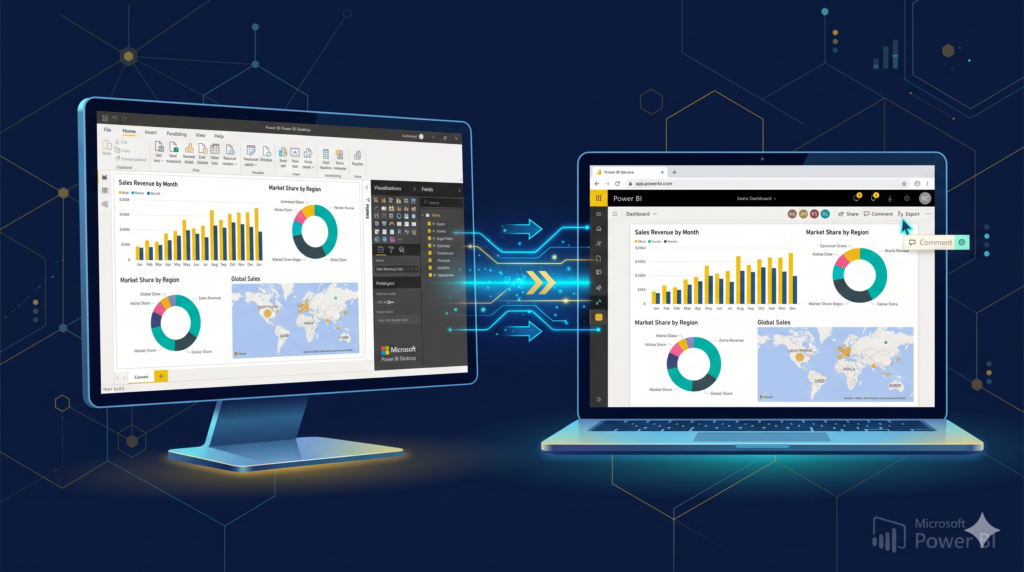
Power BI Desktop is a free Windows application you install on your computer. It is where the heavy analytical work happens. Here, you connect to data sources, clean and transform your data using Power Query, build the data model with relationships and DAX measures, and design your visual reports.
Think of Desktop as your workshop. Everything is built, tested, and refined locally before it goes anywhere. As a result, you have full control over the development process without needing an internet connection at every step.
Additionally, Desktop supports a massive range of data connectors, including SQL databases, Excel files, SharePoint lists, APIs, and many more. For teams that need to build custom spreadsheets or complex relational models, this is where that logic lives.
One important limitation to understand, however, is that Desktop is a single-user environment. You cannot share reports directly from it. Publishing is a separate step, and that is where Power BI Service enters the picture.
Power BI Service – Where Reports Come to Life for Teams
Power BI Service is the cloud-based platform at app.powerbi.com. It is where published reports are shared, scheduled, viewed, and collaborated on by your entire organization. Therefore, it transforms individual work into a team resource.
Once you publish a report from Desktop to Service, your colleagues can access it from any browser or mobile device without installing anything. Furthermore, Service introduces features that simply do not exist in Desktop: scheduled data refreshes, row-level security management, dashboard creation from multiple reports, and workspace collaboration.
For example, imagine a sales manager who needs to check live numbers every morning. The Desktop report is built and maintained by an analyst. It gets published to Service, where the manager views it on their tablet during the commute. That seamless handoff is the core value of the two-tool ecosystem.
However, Service is not for building reports from scratch. Trying to create complex models directly in Service is technically possible but inefficient. Consequently, professionals always develop in Desktop and distribute through Service.
The Workflow That Connects Both Tools
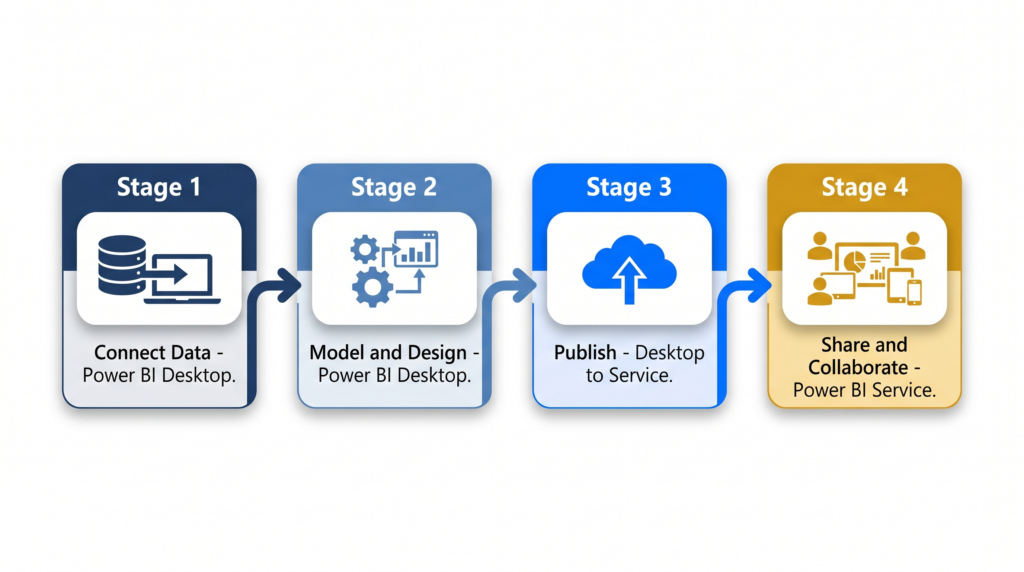
In practice, the relationship between Desktop and Service follows a clear sequence. Consequently, understanding this cycle helps you plan your analytics projects more effectively.
First, you build and test everything in Desktop. Second, you publish the .pbix file to a workspace in Service. Third, you configure scheduled refresh in Service so the data updates automatically. Finally, your team accesses the live report through their browser or the Power BI mobile app.
Moreover, when the report needs updates or new visuals, you go back to Desktop, make the changes, and republish. Service simply receives and distributes the updated version.
This division of responsibility keeps things organized. Desktop is for builders. Service is for viewers and collaborators. Additionally, Service offers premium features such as paginated reports, dataflows, and deployment pipelines for enterprise environments.
“According to Gartner’s Magic Quadrant for Analytics and Business Intelligence Platforms, Microsoft Power BI has been recognized as a Leader for multiple consecutive years, driven by its seamless cloud and desktop integration and breadth of connectivity.”
Common Mistakes Teams Make Without Guidance
Without proper guidance, businesses often run into predictable problems. For instance, many teams try to do all their modeling inside Service, which leads to slow performance and limited functionality. Others publish unfinished reports or fail to set up scheduled refreshes, leaving colleagues looking at outdated data.
Furthermore, security is frequently overlooked. Power BI Service allows row-level security configurations that control who sees what data, but these must be planned and implemented deliberately. An incorrectly configured workspace can expose sensitive business information to the wrong people.
Additionally, many organizations underutilize gateways, which are required to refresh data from on-premise sources through Service. Without this setup, cloud publishing of data stored locally on company servers simply does not work.
These are not beginner mistakes. They are architectural decisions that even experienced users get wrong without the right foundation.
Are you ready to evolve your data?
Understanding how Power BI Desktop and Power BI Service fit together is the first step toward building a truly data-driven organization. Together, these tools form a complete analytics pipeline, from raw data to actionable insights shared across your entire team.
However, designing that pipeline correctly, securing it properly, and ensuring your data stays fresh and accurate requires more than reading a tutorial. It requires experience, and that is exactly what Sapphire Business Technology delivers.
Our team of Power BI specialists has supported over 500 satisfied clients in building dashboards, integration, data models, and reporting environments that actually work in the real world. Whether you are starting from scratch or optimising an existing setup, we bring the technical depth and business understanding to get it right.
Hiring a Power BI specialists is not a cost. It is the fastest path to results you can trust. Get in touch with Sapphire Business Technology and let’s turn your data into your strongest business asset.
Content created by Sapphire Business Technology, based on expertise developed across more than 500 satisfied clients.